
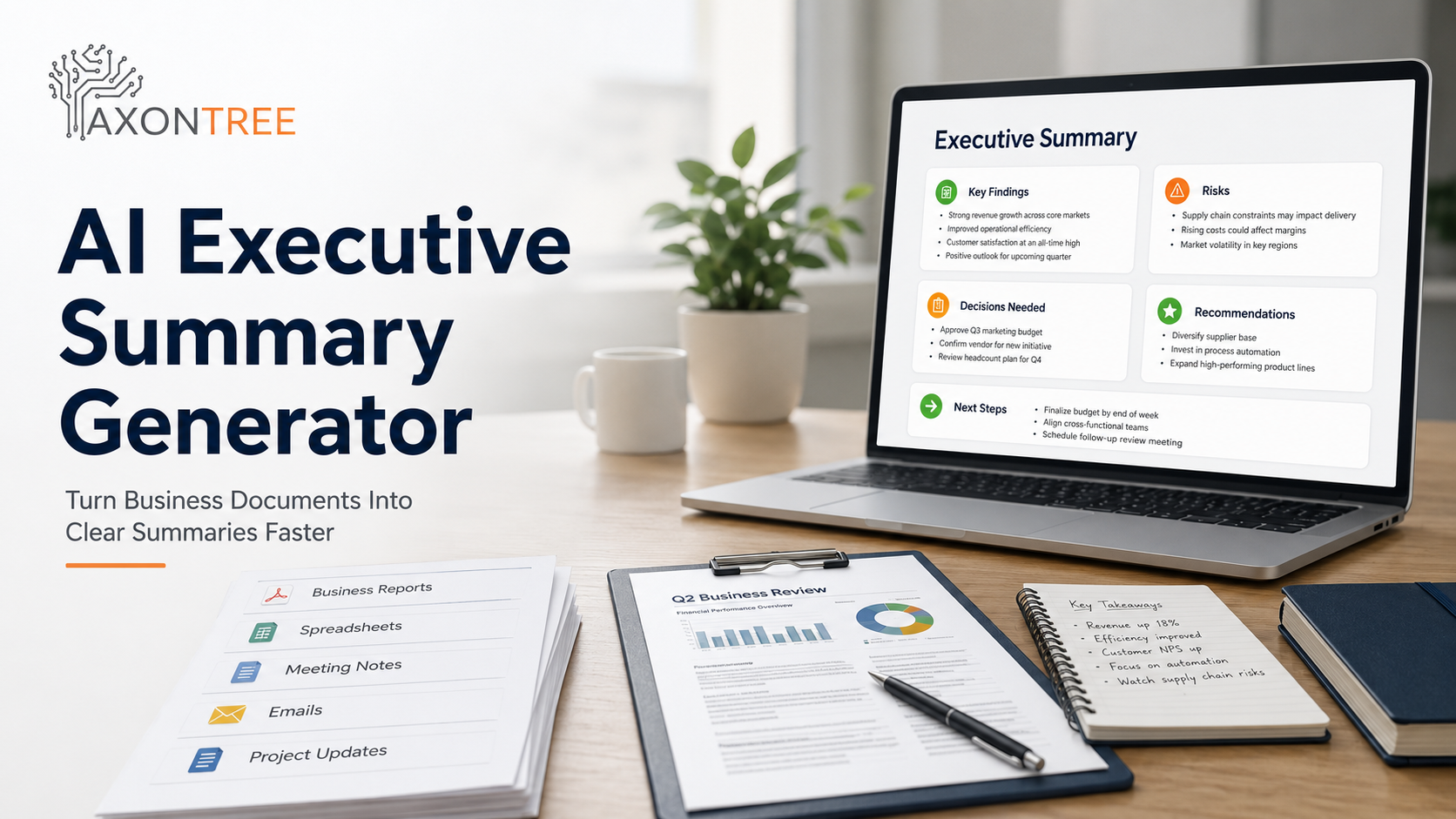
An AI Executive Summary Generator helps businesses turn long reports, meeting notes, PDFs, spreadsheets, emails, and project updates into clear executive summaries that leaders can review faster.
The problem is not that business teams lack information. The problem is that decision-makers do not have time to read every document, extract every key point, and manually identify the risks, decisions, recommendations, and next steps hidden inside scattered business files.
With the right workflow, AI can help teams create executive summaries that are not just shorter, but clearer, more structured, and easier to act on.
Quick Answer
An AI executive summary generator is a business tool that uses artificial intelligence to summarize documents into a concise, decision-ready format. It reviews business inputs such as reports, meeting notes, PDFs, spreadsheets, emails, and project updates, then organizes the most important information into key findings, risks, decisions, recommendations, and next steps.
What Is an AI Executive Summary Generator?
An AI executive summary generator is designed to help teams create short, structured summaries for people who need the business meaning, not every detail.
It can work with different types of business information, including:
- Business reports
- Meeting notes and transcripts
- Project updates
- Client emails
- PDF files
- Spreadsheets
- Sales notes
- Performance updates
- Internal memos
- Research documents
- Proposal drafts
- Operational files
The output should not simply be a shorter version of the original document. A good executive summary should explain the situation, identify what matters, highlight any risk, and show what action may be required.
Why an AI Executive Summary Generator Matters More Than Ever
Most teams are not short on information. They are short on usable information.
A project update may contain pages of details, but leadership may only need to know whether the project is on track, what changed since the last update, what risks need attention, what decision is required, and who owns the next step.
This is why executive summaries are valuable. They turn long or scattered information into leadership-ready communication.
In Canada, AI is moving from experimentation into real business workflows. Statistics Canada reported that AI use among Canadian businesses reached 19.2% in the second quarter of 2026, up from 12.2% in the second quarter of 2025 and 6.1% in the second quarter of 2024. Among AI-using businesses, data analytics and text analytics were two of the leading applications, which makes document summarization and business text workflows especially relevant.
For small and mid-sized businesses, the productivity case is also becoming clearer. CFIB reported that Canadian SMEs using GenAI can save time, with surveyed SMEs saving an average of 1.08 hours per day when using generative AI.
The Real Problem: Most AI Summaries Are Not Executive Summaries
Many teams ask AI to summarize a document and receive a shorter version of the same information. That can be useful, but it is not always an executive summary.
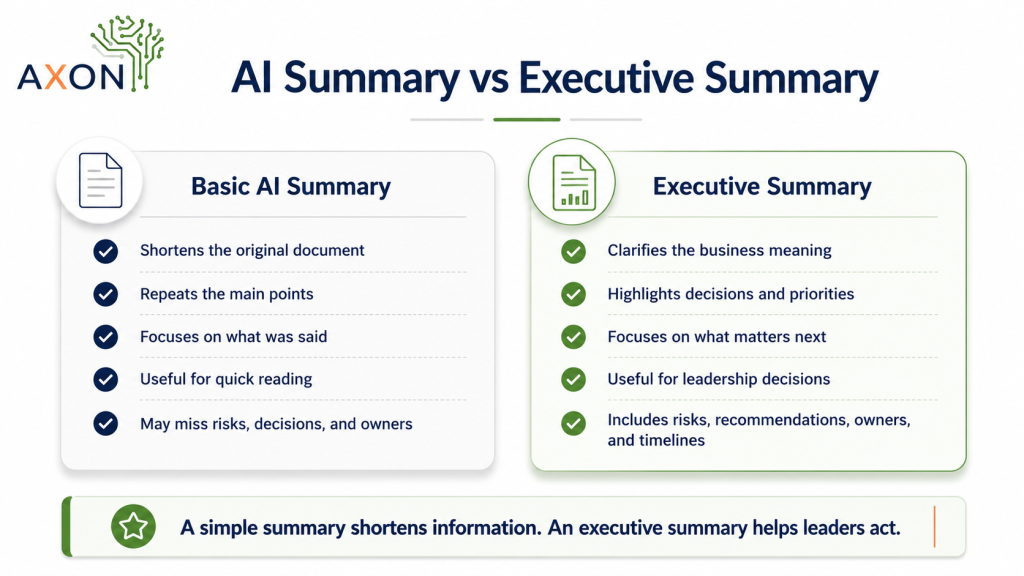
A simple summary tells readers what the document says. An executive summary tells leaders what they need to know and what action may be required.
| Basic AI Summary | Executive Summary |
|---|---|
| Shortens the original document | Clarifies the business meaning |
| Repeats the main points | Highlights decisions and priorities |
| Focuses on what was said | Focuses on what matters next |
| Useful for quick reading | Useful for leadership decisions |
| May miss risks, decisions, and owners | Includes risks, recommendations, owners, and timelines |
| Often generic | Tailored to leaders, clients, or internal stakeholders |
This difference matters because executives are not only asking, “What does this document say?” They are asking, “What should I do with this information?”
How AxonTree Helps Create Executive Summaries from Business Documents
AxonTree helps teams turn everyday business inputs into structured, decision-ready documents, summaries, briefings, and Office-ready outputs.
Instead of treating AI as a generic summarizer, AxonTree supports a practical AI document automation workflow that helps teams move from raw business inputs to clearer outputs for review and action.
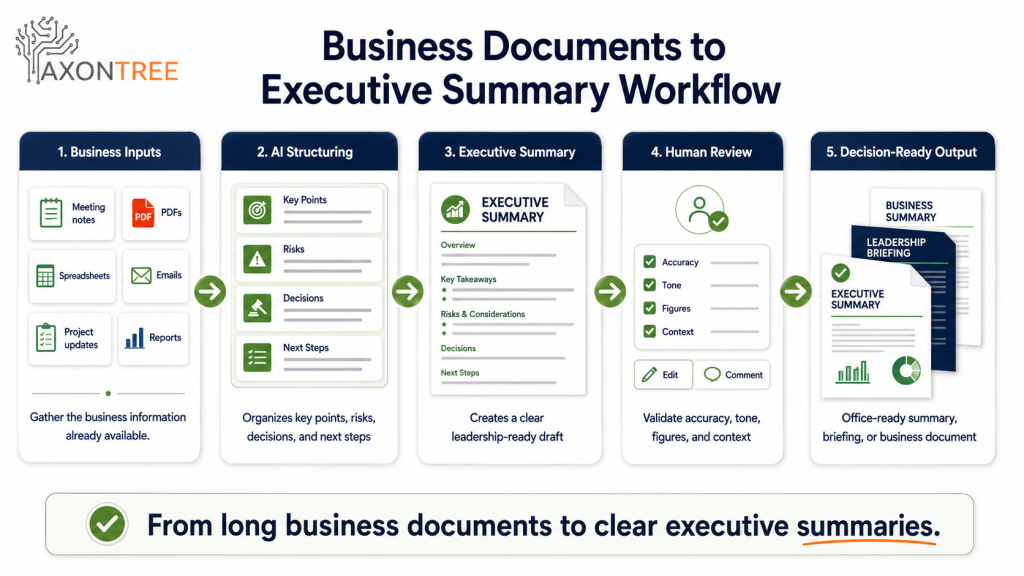
A typical AxonTree-style workflow looks like this:
- Upload or organize the relevant business inputs.
- Select the type of output needed, such as an executive summary, client update, briefing, or project summary.
- Structure the content around key findings, decisions, risks, recommendations, and next steps.
- Generate a first draft.
- Review, refine, validate, and share the final document.
This is especially useful for teams that repeatedly prepare leadership updates, client summaries, project reports, sales reviews, performance summaries, and board-level briefings.
The 7-Part Executive Summary Framework
A strong executive summary needs structure. Without structure, AI-generated summaries can sound general or miss the decision layer.
| Executive Summary Section | What It Should Answer |
|---|---|
| 1. Business Context | What is this document about, and why does it matter? |
| 2. Key Findings | What are the most important points? |
| 3. Current Status | Where does the project, client, or business issue stand now? |
| 4. Risks or Blockers | What could slow progress, increase cost, or affect results? |
| 5. Decisions Needed | What does leadership need to approve, reject, confirm, or discuss? |
| 6. Recommended Next Steps | What should happen next? |
| 7. Owners and Timeline | Who is responsible, and by when? |
This framework helps turn business information into a document leaders can actually use.
How to Use an AI Executive Summary Generator: Step-by-Step Workflow
Step 1: Define the Purpose of the Summary
Before using AI, decide why the executive summary is being created. A leadership briefing, client update, board summary, project review, sales decision, and monthly performance update all need different levels of detail.
The purpose should guide the tone, structure, length, and level of business context.
Step 2: Gather the Right Business Inputs
An executive summary is only as good as the information behind it. The mistake many teams make is summarizing one document when the real context is spread across several files.
For example, a client project executive summary may need meeting notes, timeline updates, completed tasks, budget information, client feedback, email discussions, risk notes, and next-step commitments.
This is also why a simple document summarizer may not be enough for growing teams. An AI document generator for small businesses becomes more useful when it can help structure information from multiple business sources into one usable output.
Step 3: Choose the Right Executive Summary Type
Not every executive summary serves the same audience. Choosing the right type helps AI produce a more relevant output.
| Summary Type | Best For | Should Include |
|---|---|---|
| Project executive summary | Project reviews and delivery updates | Status, progress, blockers, milestones, risks, next steps |
| Client executive summary | Client communication | Context, completed work, decisions, open questions, next actions |
| Leadership briefing | Internal decision-making | Key issue, business impact, recommendation, decision required |
| Financial summary | Budget or performance review | Numbers, trends, variance, risk, forecast, recommendation |
| Sales summary | Opportunity review | Client need, deal stage, objections, timeline, next action |
| Operations summary | Internal workflow improvement | Problem, impact, process gaps, recommended action |
Step 4: Use AI to Extract Decisions, Risks, and Next Steps
A weak prompt asks, “Summarize this document.”
A stronger business prompt asks: “Create an executive summary for leadership. Focus on business context, key findings, risks, decisions required, recommendations, owners, and next steps. Keep it concise and decision-ready.”
That difference changes the output. It moves AI from summarizing text to preparing a business document, which is where an AI executive summary generator becomes more useful than a basic summarizer.
Step 5: Review for Accuracy, Context, and Confidentiality
AI-generated executive summaries should always be reviewed before sharing. This is especially important when the document includes client information, financial numbers, employee details, internal strategy, or confidential business files.
Before publishing or sending the summary, check:
- Are the numbers correct?
- Are names, roles, and dates accurate?
- Are decisions clearly separated from suggestions?
- Are risks explained in the right context?
- Is the recommendation practical?
- Is the tone suitable for the audience?
- Has confidential information been handled carefully?
- Are owners and deadlines clear?
This review step also matters because AI governance is becoming a leadership issue. PwC Canada reported that responsible AI governance is a top priority for many Canadian organizations, while dedicated governance functions are still not universal.
Step 6: Format the Summary for Business Use
A good executive summary should be easy to scan. Use short paragraphs, clear headings, bullet points, owner tables, risk summaries, and recommendation sections.
This is one reason AxonTree focuses on structured, Office-ready outputs. Business teams do not only need AI-generated text. They need documents that can be reviewed, shared, presented, and reused in real workflows.
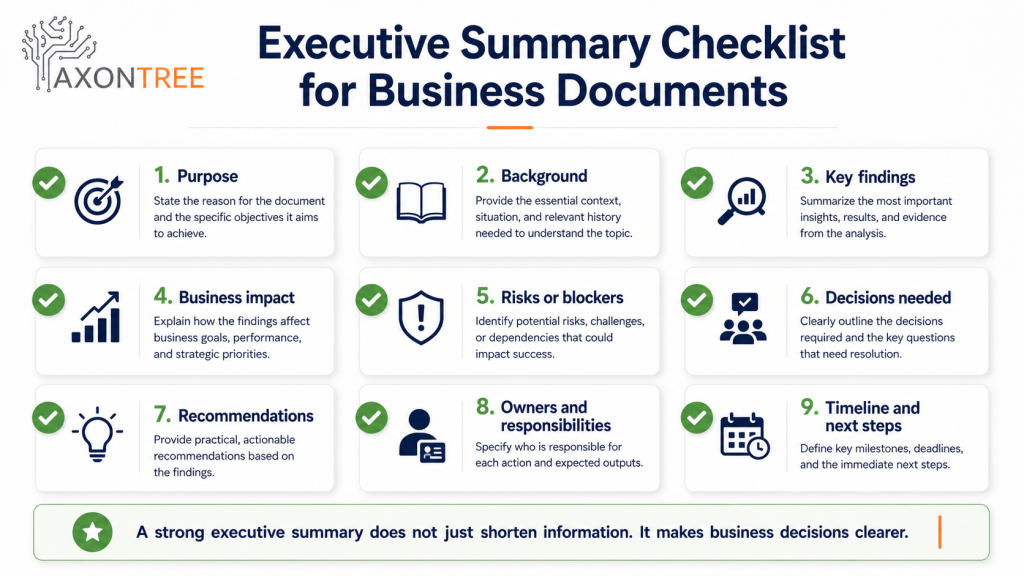
What Should an AI-Generated Executive Summary Include?
| Element | Why It Matters |
|---|---|
| Purpose | Explains why the summary exists |
| Background | Gives enough context to understand the issue |
| Key findings | Shows what matters most |
| Business impact | Explains why the information matters |
| Risks or blockers | Helps leaders see what may go wrong |
| Decisions required | Makes leadership involvement clear |
| Recommendations | Gives direction |
| Action items | Turns insight into work |
| Owners | Creates accountability |
| Timeline | Makes follow-up measurable |
Example: Using an AI Executive Summary Generator for Business Documents
Imagine a Canadian consulting firm preparing a monthly client leadership update.
The team has meeting notes, a project timeline, client feedback, a budget spreadsheet, completed task lists, email updates, risk notes, and next-step commitments.
Without AI, someone has to read everything, copy the key details, rewrite the update, format the summary, and check it for clarity.
With an AI executive summary generator, the team can organize those inputs into a structured first draft. The final summary may include:
- Project status: The project is on track, with two milestones completed and one pending client approval.
- Key progress: The team completed the discovery review, prepared the first implementation plan, and collected feedback from the client team.
- Risks: The timeline may shift if approval is delayed beyond the agreed review date.
- Decision needed: Client leadership needs to confirm the final scope before the next phase begins.
- Next steps: The project team will update the delivery plan, confirm responsibilities, and prepare the next client briefing.
This is the difference between a document recap and a decision-ready executive summary.
Why AI Executive Summary Generator Workflows Matter for Canadian Businesses
Canadian businesses are increasingly exploring AI, but the best results come when AI is connected to a specific workflow. Statistics Canada reported that AI use among Canadian businesses reached 19.2% in the second quarter of 2026. The same analysis showed that data analytics and text analytics were among the most common AI applications.
CFIB also reported that nearly 45% of Canadian businesses use generative AI in their operations, with adoption increasing by firm size. This shows that AI is no longer only an enterprise topic. Small businesses, professional service firms, and growing teams are also looking for practical ways to improve productivity and output quality.
For document-heavy work, an AI executive summary generator is one of the clearest places to apply AI because executive summaries are repeated, time-consuming, and connected to business decisions.
What Competitors Often Miss: Executive Summaries Need a Decision Layer
Many AI tools focus on summarization. They can reduce a long document into a shorter document. That is helpful, but it does not always solve the leadership problem.
Executives usually need answers to different questions:
- What should I know?
- What changed?
- What decision is needed?
- What is the risk?
- What happens next?
- Who owns it?
This is the decision layer.
A strong AI executive summary generator should not only compress information. It should organize information around decisions, risks, recommendations, and action. That is where AxonTree becomes relevant because it focuses on structured business outputs, not only generic summaries.
Best Business Documents to Use with an AI Executive Summary Generator
Start with documents that are long, repeated, and decision-related.
| Document Type | Why It Is a Good Fit |
|---|---|
| Project updates | They often contain progress, risks, blockers, and next steps |
| Client meeting notes | They need follow-up, decisions, and action items |
| Business reports | They contain important information but are often too long |
| Research documents | They need key findings and recommendations |
| Sales notes | They need deal status, objections, next steps, and timing |
| Internal memos | They often need leadership review |
| Performance updates | They need trends, issues, and actions |
| Board materials | They need concise decision-ready summaries |
The best first workflow is usually a document your team creates every week or every month.
AI Executive Summary Generator vs AI Document Summarizer
| Feature | AI Document Summarizer | AI Executive Summary Generator |
|---|---|---|
| Main purpose | Shorten content | Support business decisions |
| Output | General summary | Leadership-ready summary |
| Focus | What was said | What matters and what happens next |
| Best for | Reading faster | Deciding faster |
| Includes risks | Sometimes | Should be included |
| Includes recommendations | Not always | Should be included |
| Includes action items | Sometimes | Should be clear |
| Best audience | General readers | Executives, managers, clients, and stakeholders |
How to Know If Your Team Needs an AI Executive Summary Workflow
Your team may need an AI executive summary workflow if:
- Leaders ask for shorter updates.
- Reports take too long to prepare.
- Important decisions are buried in long documents.
- Teams repeatedly rebuild similar summaries.
- Project risks are noticed too late.
- Client updates require too much manual rewriting.
- Business owners are always editing final documents.
- Meetings create follow-up work that is not clearly documented.
- Spreadsheets, notes, PDFs, and emails all need to be combined.
- Internal documents are too detailed for quick leadership review.
If meetings are a major source of follow-up work, you may also want to read AxonTree’s guide on how to turn meeting notes into business documents.
How AxonTree Fits Into the AI Executive Summary Generator Workflow
AxonTree helps businesses create structured, review-ready outputs from everyday business inputs. For executive summary workflows, this means moving from scattered business files to clearer summaries, briefings, and decision-ready documents.
For executive summary workflows, this means teams can move faster from:
- Long documents to clear summaries
- Meeting notes to leadership briefings
- PDFs and spreadsheets to decision-ready updates
- Client files to professional summaries
- Project information to structured business documents
Final Takeaway: Use an AI Executive Summary Generator for Clearer Business Decisions
An AI executive summary generator can help businesses save time, but the real value is clarity.
The goal is not to create shorter documents. The goal is to create better business communication.
For small businesses, professional service firms, and enterprise teams, executive summaries should help leaders understand what matters, what changed, what risks exist, what decision is needed, and what should happen next.
AxonTree helps teams turn business documents, meeting notes, PDFs, spreadsheets, emails, and project updates into structured executive summaries, briefings, and Office-ready outputs that are easier to review and act on.
Frequently Asked Questions
What is an AI executive summary generator?
An AI executive summary generator is a tool that uses artificial intelligence to turn business documents, meeting notes, PDFs, spreadsheets, emails, and project updates into concise summaries for leaders, clients, or decision-makers.
What Is AI Document Automation? How It WorksWhat Is AI Document Automation? How It Works