Important business information is often spread across meeting notes, spreadsheets, emails, PDFs, project updates, client messages, and shared folders. AI Document Automation helps transform these disconnected inputs into clear, structured documents, reducing hours of manual work, minimizing rework, and providing leaders with consistent updates that are easier to compare, review, and act on.
Quick Answer:
| AI document automation uses artificial intelligence to collect, organize, and transform business information into structured documents. Rather than manually copying from notes, emails, spreadsheets, PDFs, and meetings, teams can create reviewed drafts of executive summaries, client briefings, project updates, presentations, and other business-ready outputs faster and more consistently. |
Why Businesses Need AI Document Automation
Most business documents do not start from one clean source. A client update may combine spreadsheets, emails, previous deliverables, project notes, and a call summary. A leadership briefing may need milestones, risks, financial updates, decisions required, and action items from several teams.
When that work is done manually, people spend too much time finding information, deciding what is relevant, rewriting updates, checking formats, and correcting the same issues during review. The result is often slow preparation, missing context, uneven quality, and documents that look different from one department to the next.
AI document automation creates a repeatable path from the business information you already have to an output that is structured, review-ready, and easier to use.
Common signs that a document workflow needs improvement include:
- Teams repeatedly copy and paste the same information into similar documents.
- Managers spend too long gathering updates before meetings.
- Reviewers need to ask for missing facts, owners, dates, or next steps.
- Documents follow different formats depending on who prepared them.
- A decision is delayed because key context is buried in several sources.
AI Document Automation Is More Than OCR, Templates, or AI Chat
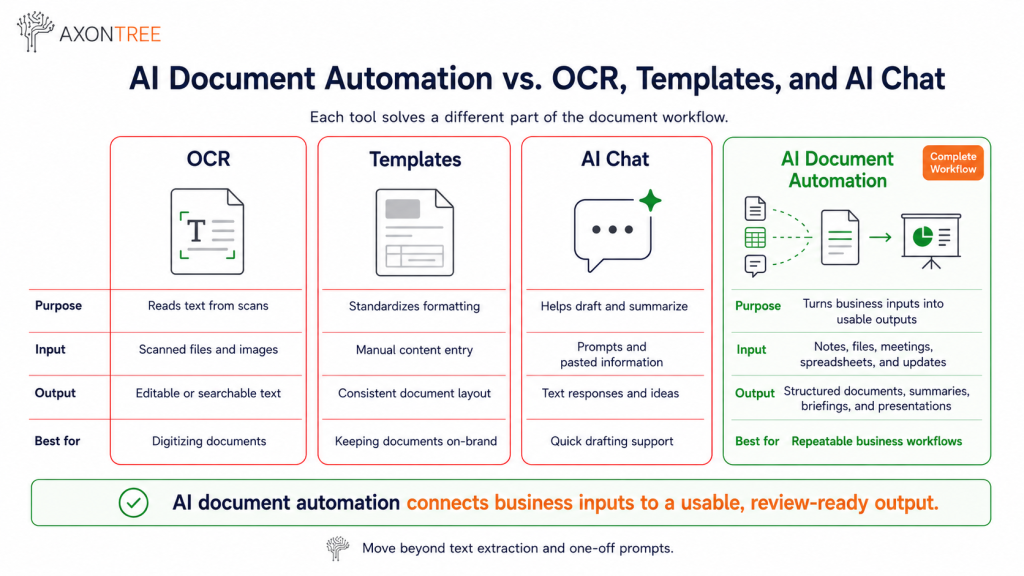
Several technologies can improve document work, but they solve different parts of the process. Understanding the distinction helps teams choose the right workflow instead of buying a tool that only addresses one step.
| Tool | What It Does | Typical Output | Best Fit |
|---|---|---|---|
| OCR | Reads text from scanned files or images. | Searchable or editable text. | Digitizing paper or scanned documents. |
| Intelligent document processing | Extracts and classifies details from structured or semi-structured documents. | Fields such as dates, values, IDs, or invoice details. | High-volume extraction and validation. |
| Traditional templates | Keeps layout and approved wording consistent. | A pre-set document format. | Standardizing brand and formatting. |
| General AI chat tools | Helps draft, summarize, and brainstorm from a prompt. | Text responses or one-off drafts. | Quick drafting support. |
| AI document automation | Connects relevant business inputs to a defined document workflow. | Structured, review-ready documents, summaries, briefings, and presentations. | Recurring business workflows that need consistency. |
The key difference: AI document automation is not limited to reading a file or generating a paragraph. It helps turn relevant business inputs into a structured output that people can review, share, present, and use.
How AI Document Automation Works
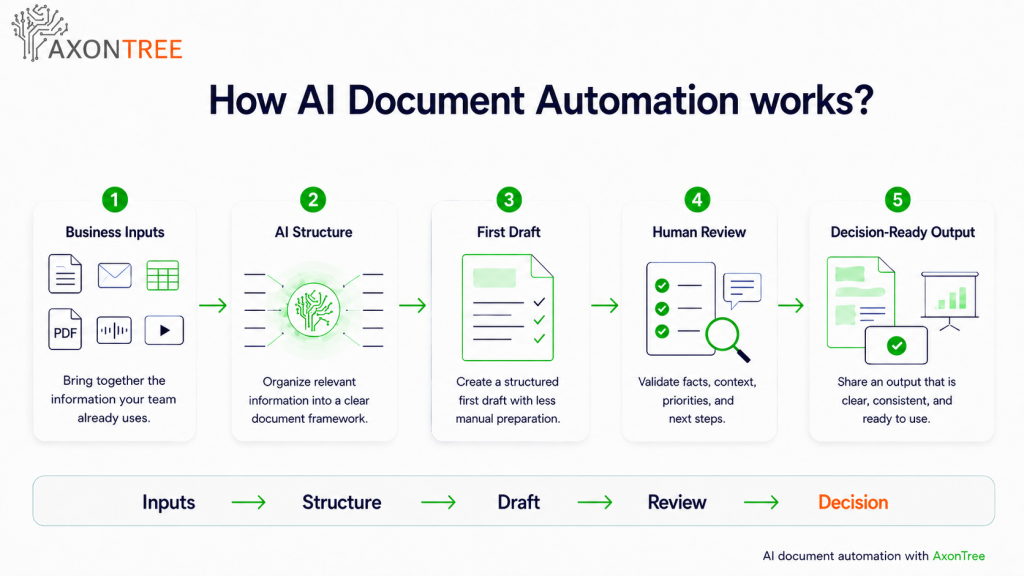
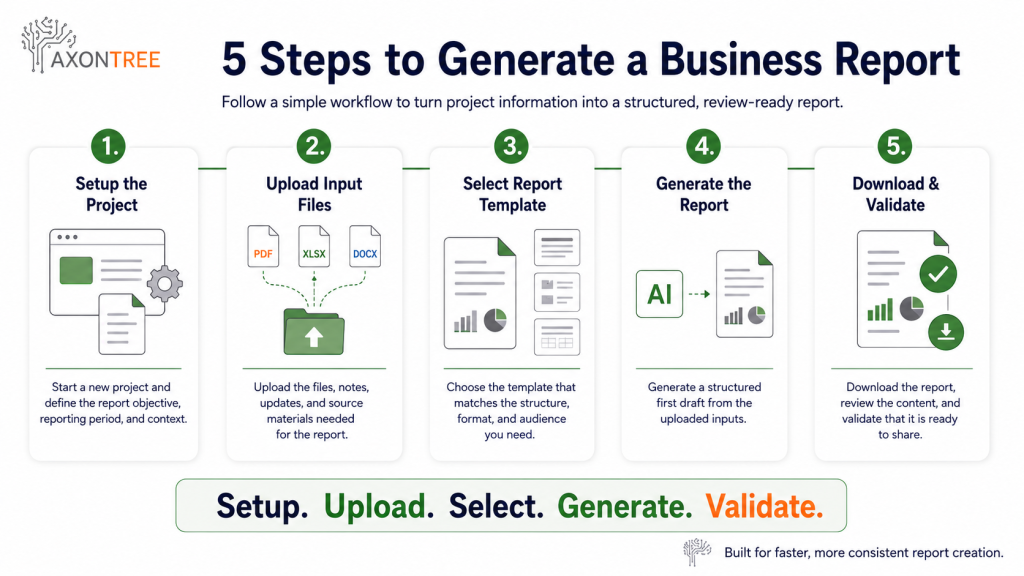
A reliable workflow usually follows five stages. The exact sources and outputs differ by team, but the underlying process remains the same.
1. Gather the right business inputs
Start with the information needed for one specific workflow. This may include notes, emails, Word documents, PDFs, spreadsheets, meeting summaries, audio or video content, project files, and client communications. More input is not always better. The right input is the information that supports the final document.
2. Define the output and its purpose
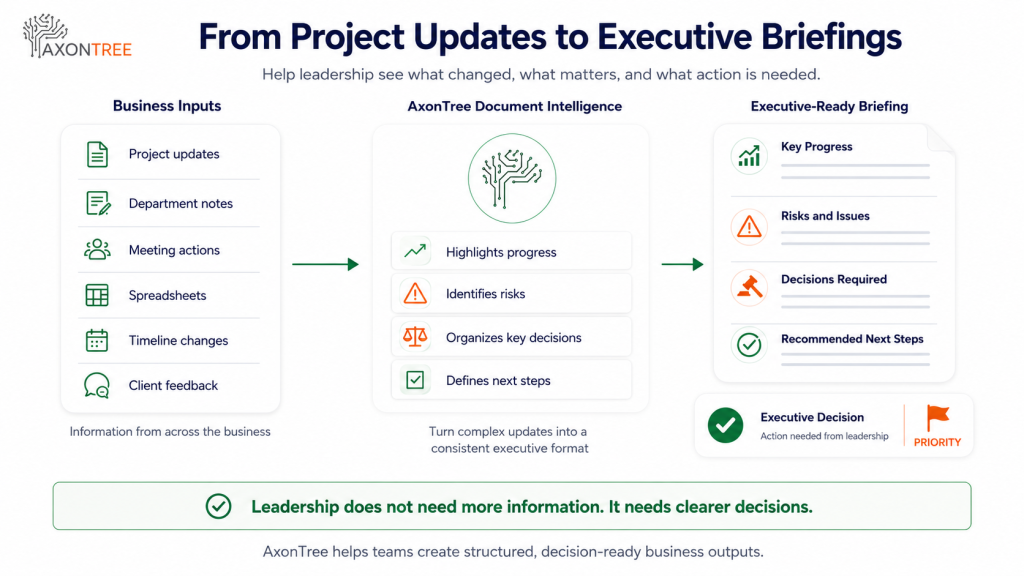
Decide what the finished document must help a reader do. An executive briefing should make priorities, risks, decisions required, and next steps clear. A client update should make progress, deliverables, actions, and timing clear. The output purpose guides what information is included.
3. Apply a repeatable structure
Create a clear format with the sections that should appear each time. This might include an overview, key updates, metrics, risks, decisions, owners, deadlines, and recommended next steps. A defined structure makes reviews faster and makes documents easier to compare over time.
4. Generate a structured first draft
AI organizes the relevant information into the selected format. This removes much of the manual effort involved in gathering, rephrasing, and arranging content. The result should be treated as a high-quality first draft, not an unquestioned final version.
5. Review, refine, and share
A responsible workflow includes human review. The document owner confirms facts, context, dates, figures, confidential information, and audience suitability before the document is shared. This keeps accountability with the people closest to the work.
Where AI Document Automation Delivers the Most Value?
Meeting notes to accountable follow-ups
Turn meeting notes, recordings, or transcripts into an organized follow-up document with decisions, action items, owners, deadlines, and escalation points. This helps prevent decisions from disappearing into personal notes.
Project updates to executive briefings
Convert detailed operational updates into concise leadership documents that highlight progress, risks, decisions required, and next steps. Leaders do not need every task. They need the context required to act.
Spreadsheets and notes to client-ready documents
Bring together service details, project progress, milestones, and relevant data to prepare consistent client updates, proposals, or deliverables with less manual rebuilding.
Recurring department documents
Standardize weekly, monthly, or quarterly updates across operations, sales, marketing, project delivery, or leadership teams. This is often the best starting point because the structure already exists and the preparation work repeats.
Why This Matters for Canadian Businesses?
Canadian businesses are moving beyond broad AI experimentation and looking for practical workflows where technology can reduce manual effort. Statistics Canada reported that 12.2% of Canadian firms used AI to produce goods or deliver services in 2025, while an additional 14.5% planned to adopt AI within the next 12 months. Separately, the Canadian Federation of Independent Business reported that Canadian SMEs using generative AI saved an average of 1.08 hours per day. These figures are not a promise that every tool will produce the same result, but they show why organizations are prioritizing focused, repeatable use cases.
| What this means in practice: document workflows are a sensible place to begin because the inputs already exist, the outputs are familiar, and the gains are easier to observe through reduced rework, clearer reviews, and faster preparation. |
How Small Businesses Should Start
Small businesses do not need to automate every document at once. Start with one workflow that happens frequently, follows a repeatable structure, and takes too much time to prepare manually.
Good first candidates include:
- Weekly client updates
- Monthly operations summaries
- Meeting follow-up documents
- Project status documents
- Proposal preparation workflows
- Internal leadership briefings
Before you automate, answer these questions:
- Which business inputs are currently used to create the document?
- What sections should appear every time?
- Who prepares the draft and who reviews the final version?
- What information is often missing or difficult to find?
- What action should the reader be able to take after reading it?
What Enterprise Teams Should Prioritize
For enterprise teams, speed is important, but consistency, governance, access control, and auditability are equally important. A document automation approach should support the organization’s required standards rather than create a separate, uncontrolled process.
- Approved document structures, terminology, and templates
- Clear access to sensitive data and files
- Defined review and approval workflows
- Consistent outputs across departments and recurring processes
- Ownership for source inputs and final documents
- A practical fit with existing Microsoft 365 and operational workflows
Common Mistakes to Avoid
Treating AI output as the final document
AI can accelerate preparation, but business owners and subject-matter experts should still validate accuracy, context, numbers, dates, confidentiality, and audience suitability.
Automating a broken process
If people do not agree on what a document should contain, automation will only produce inconsistent results faster. Define the required sections, owners, inputs, and review process first.
Using every available file without a purpose
Relevant information is better than unlimited information. A focused input set improves the quality, speed, and clarity of the output.
Ignoring the reader
An operational update, client document, and executive briefing should not have the same level of detail. Design the document around the decisions or actions its audience needs to take.
Measuring only time saved
Track fewer revisions, more complete updates, faster review cycles, reduced information hunting, better consistency, and clearer decisions as well as time saved.
How AxonTree Helps
AxonTree is built for businesses that need to turn raw business information into structured, decision-ready documents. The platform supports inputs such as emails, notes, spreadsheets, PDFs, audio, video, and project updates, then helps teams prepare professionally formatted Office 365 documents, executive summaries, briefings, contracts, and presentation-ready outputs.
For small businesses and professionals, this can mean less time rebuilding client-facing or internal documents. For enterprise teams, it can support standardized document workflows across departments, leadership teams, PMOs, and client delivery processes. The goal is not simply faster writing. It is a more reliable way to move from business information to usable output.
Explore the workflow: See how AxonTree works | Small business and professional solutions | Enterprise solutions
What To Do Next
Use this simple starting plan to assess whether AI document automation is worth piloting in your business:
- Choose one recurring document workflow.
- List the inputs currently used to prepare it.
- Define the structure and required sections.
- Identify the reviewer and final audience.
- Run a small pilot and compare preparation time, revision cycles, and clarity.
- Expand only after the process is working reliably.
| Turn recurring business inputs into clearer, decision-ready documents. Book a demo to explore an AxonTree workflow for your team. Book a Demo |
Final Takeaway
AI document automation helps teams turn raw business information into clearer, more consistent, and more usable documents. The strongest use cases are recurring workflows where people repeatedly gather data from multiple places, organize it, format it, review it, and share it with someone who needs to take action. With a defined structure and human review, teams can reduce repetitive document work without giving up business accountability.
What is AI document automation?
AI document automation uses artificial intelligence to organize business information and create structured documents. It can support summaries, client briefings, project updates, executive documents, presentations, and other recurring outputs from inputs such as notes, emails, spreadsheets, PDFs, meetings, and project files.
Is AI document automation the same as OCR?
No. OCR converts scanned text or images into readable text. AI document automation is broader because it can use relevant information from multiple sources to create a structured, review-ready business output.
Can small businesses use AI document automation?
Yes. Small businesses can begin with one recurring workflow, such as a client update, meeting follow-up, proposal, project summary, or internal operations document. The best starting point is a document that takes time to prepare and follows a repeatable format.
Does AI document automation replace human review?
No. AI can help prepare a first draft, but people should review important outputs for accuracy, context, confidentiality, dates, figures, and audience suitability before sharing them.
What documents can AI document automation create?
Depending on the workflow, AI document automation can support executive summaries, project updates, client briefings, meeting follow-ups, proposals, presentations, recurring department documents, and other structured business outputs.