An AI document generator for small businesses is useful because most small businesses are not struggling with writing itself. They lose time because every client-ready document starts with scattered information.
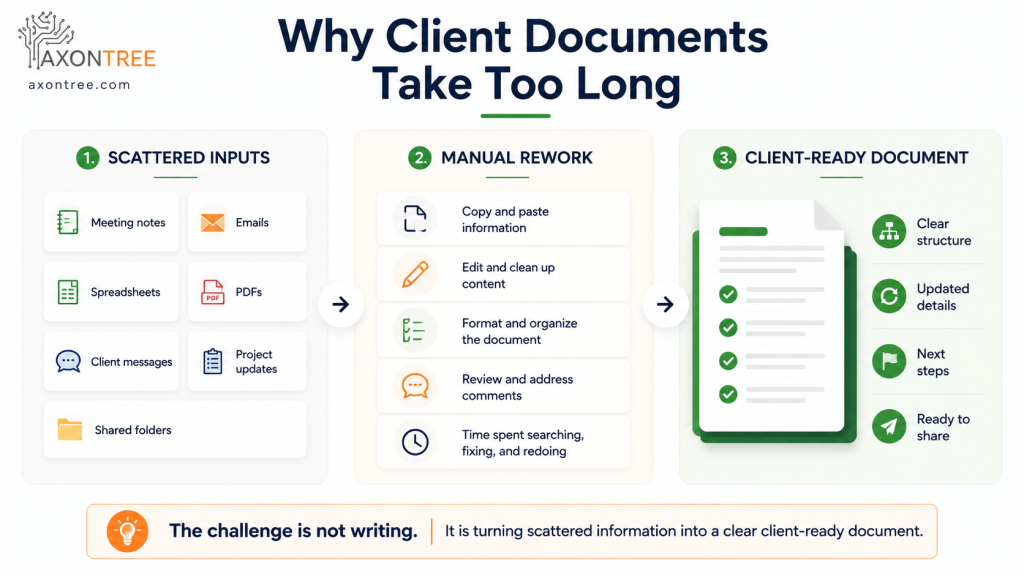
The proposal is in one folder. The meeting notes are in another. The pricing details are in a spreadsheet. The client feedback is buried in an email thread. The project update is sitting in someone’s notes. By the time everything is gathered, rewritten, formatted, checked, and shared, hours have already been spent before the real client conversation begins.
AI helps small businesses create client-ready documents faster by turning scattered business inputs into structured, professional drafts that are easier to review, refine, and send with confidence.
QUICK ANSWER
| AI helps small businesses create client-ready documents faster by organizing notes, emails, spreadsheets, PDFs, meeting summaries, project updates, and business files into structured drafts. An AI document generator for small business reduces manual copying, rewriting, and formatting so teams can prepare proposals, client updates, summaries, briefings, and presentations with less rework and greater consistency. The real value is not just faster writing. It is a more reliable workflow from business information to a polished document the client can understand and act on. |
Why Client-Ready Documents Take So Long for Small Businesses
Most client documents are not created from one clean source.
A small business may need to prepare a proposal using discovery call notes, previous pricing, scope details, service packages, timeline estimates, client requirements, and examples of past work. A monthly client update may need project progress, completed deliverables, pending tasks, risks, next steps, and performance data.
The challenge is not only writing the document. The challenge is collecting the right information and turning it into a clear format. This is where an AI document generator for small businesses can help by organizing scattered inputs into a structured first draft.
Common problems include:
- Important client details are spread across emails, notes, PDFs, spreadsheets, and shared folders.
- Team members use different document formats.
- Proposals and updates take too long to prepare.
- Small errors appear when information is copied manually.
- The business owner becomes the final editor for every client document.
- Documents feel inconsistent from one client to another.
- Review cycles take longer because key context is missing.
For small businesses, this creates a hidden cost. Time spent rebuilding documents is time not spent selling, serving clients, improving delivery, or making decisions.
What Are Client-Ready Documents?
Client-ready documents are business documents that are clear, professional, accurate, structured, and suitable to share with a client after review.
- Proposals
- Project updates
- Client summaries
- Service plans
- Onboarding documents
- Meeting follow-ups
- Progress reports
- Scope documents
- Business presentations
- Executive summaries
- Renewal documents
- Delivery updates
A client-ready document should answer four basic questions:
1. What is this about?
2. What has been done or proposed?
3. What matters most to the client?
4. What should happen next?
If a document looks polished but does not answer those questions clearly, it is not truly client-ready.
How an AI Document Generator for Small Business Changes the Workflow
AI does not simply make writing faster. Used properly, it changes the entire document preparation process.
Instead of starting from a blank page, a small business can start from the information it already has. AI can help organize that information into a structured draft based on the document type, audience, and purpose.
| Traditional Document Process | AI-Supported Document Process |
|---|---|
| Search emails, notes, files, and spreadsheets manually. | Upload or connect the relevant business inputs. |
| Copy and paste useful details into a document. | Let AI organize relevant details into a structure. |
| Rewrite everything from scratch. | Start with a structured first draft. |
| Manually format headings and sections. | Use a repeatable document structure. |
| Review for missing details after the document is mostly complete. | Review a clearer draft earlier in the process. |
| Rebuild similar documents repeatedly. | Reuse workflows for recurring client documents. |
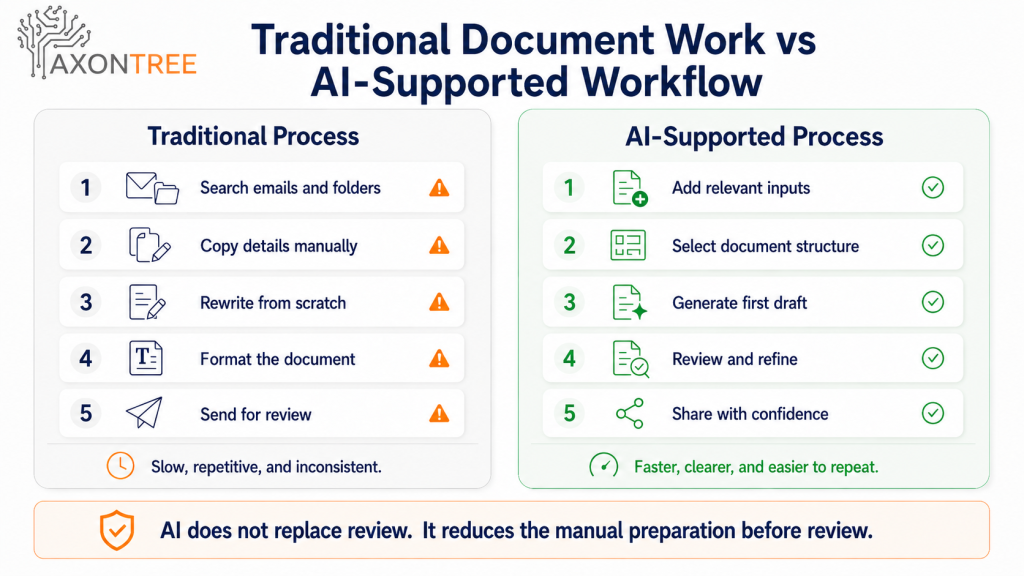
This is the type of workflow AxonTree is built around: helping teams move from everyday business inputs to structured documents, summaries, briefings, and presentation-ready outputs without rebuilding everything manually.
The Small Business Client-Ready Document Workflow
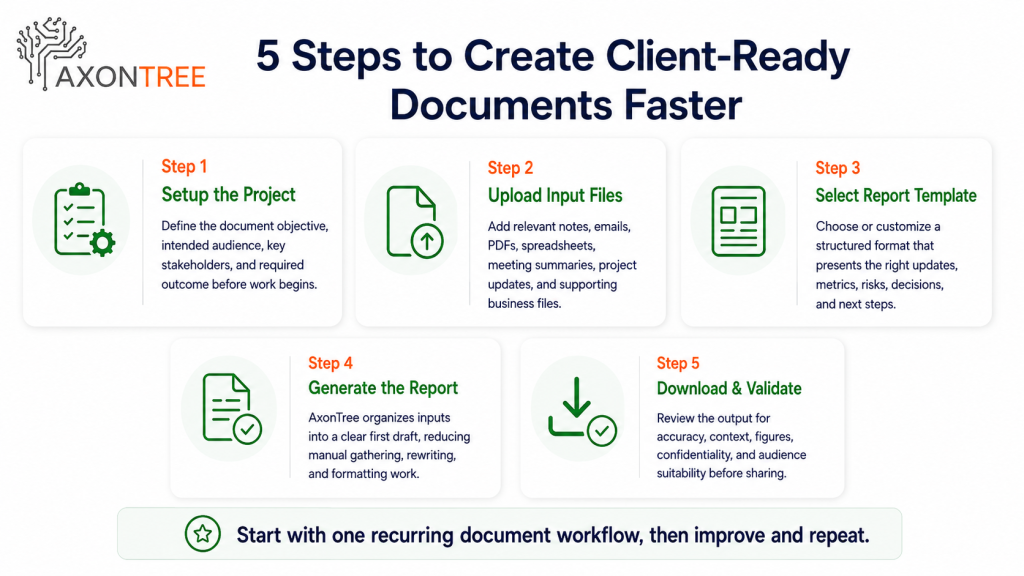
A practical AI document workflow should follow five steps. These steps keep the process focused, reviewable, and suitable for client-facing work.
1. Setup the Project
Define the document objective, intended audience, key stakeholders, and required outcome before work begins. Clear purpose keeps the workflow focused and ensures the final document supports the right client conversation or decision.
2. Upload Input Files
Add the relevant notes, emails, PDFs, spreadsheets, meeting summaries, project updates, and supporting business files. More input is not always better. The strongest input set is the information that directly supports the final document.
3. Select Report Template
Choose or customize a structured format that presents the right updates, metrics, risks, decisions, next steps, and client context. In practice, this template may support a proposal, client update, business document, briefing, or presentation-ready output.
4. Generate the Report
AxonTree organizes your inputs into a clear first draft, reducing the manual work of gathering, rewriting, and formatting information. The draft gives your team a stronger starting point than a blank page.
5. Download & Validate
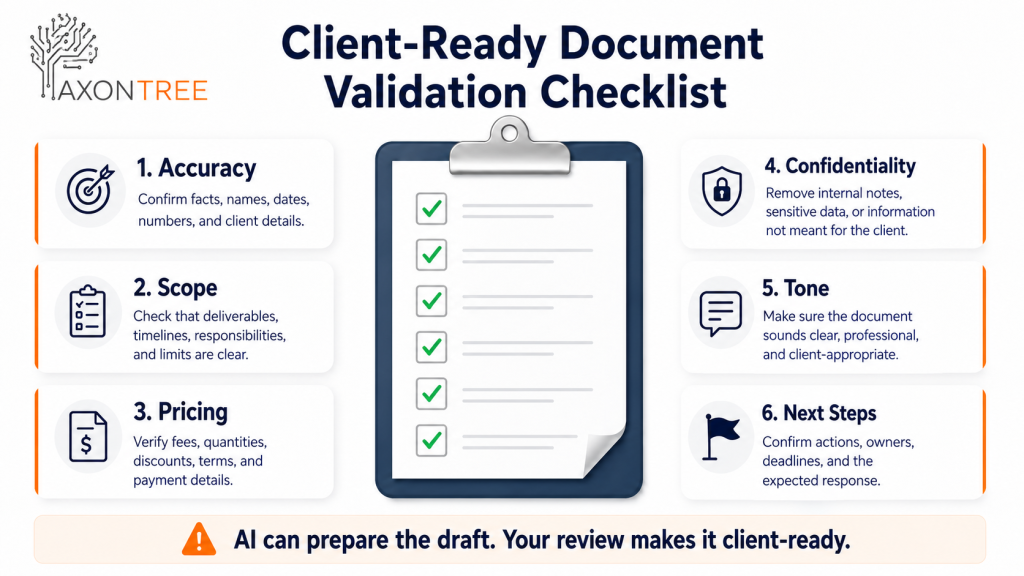
Review the output for accuracy, context, figures, scope, confidentiality, and audience suitability before sharing it with stakeholders or clients. AI helps prepare the draft faster, but the business remains accountable for the final version.
Where AI Helps Small Businesses the Most
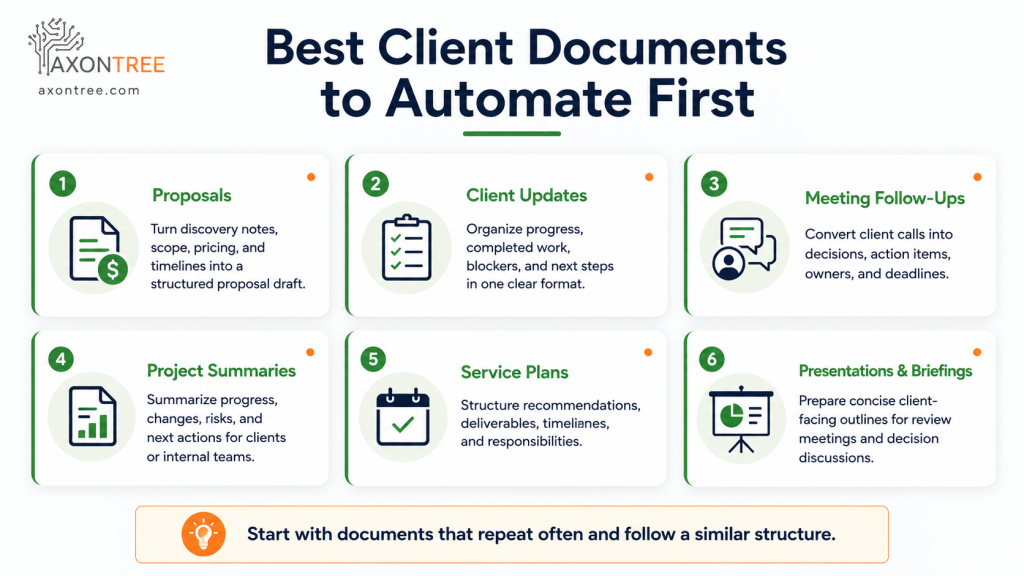
AI document automation is most useful when a document is repeated often, uses similar inputs, and needs a consistent structure.
Proposals
Proposals can take hours because they often combine discovery notes, scope details, timelines, pricing, and service explanations. AI can help turn client requirements and service information into a structured proposal draft that can be refined before sending.
Client Updates
Many small businesses send recurring updates to clients but recreate them manually every time. AI can help organize progress, completed tasks, pending items, blockers, and next steps into a clean update format.
Meeting Follow-Ups
Client calls often contain decisions, questions, objections, action items, deadlines, and next steps. AI can help turn meeting content into a follow-up document that is clear and accountable.
Project Summaries
Small businesses often need to summarize progress for clients, partners, or internal teams. AI can help turn detailed project information into a clear summary that highlights what happened, what changed, what is delayed, and what needs attention.
Presentations and Briefings
Some clients do not want a long document. They want a short, clear presentation or briefing. AI can help convert source information into a presentation-ready outline or briefing structure.
| Document Type | Why It Is a Good First Workflow | Typical Inputs |
|---|---|---|
| Client update | Repeated often and easy to standardize. | Project notes, completed tasks, upcoming actions, client feedback |
| Proposal | High business value and often rebuilt from similar information. | Discovery notes, scope details, pricing, service descriptions |
| Meeting follow-up | Improves accountability after client conversations. | Meeting notes, transcript, action items, questions, deadlines |
| Project summary | Helps clients and managers understand progress quickly. | Timeline updates, risks, deliverables, milestones |
| Presentation briefing | Supports sales, review meetings, and decision conversations. | Summary notes, data points, recommendations, visuals |
Why This Matters for Canadian Small Businesses
Canadian small businesses are under pressure to do more with limited time, smaller teams, and rising operating costs. That makes practical productivity tools more valuable than broad AI experimentation. Statistics Canada reported that 12.2% of Canadian firms used AI to produce goods or deliver services in 2025, double the share from the previous year, while another 14.5% planned to adopt AI within the next 12 months.
The Canadian Federation of Independent Business reported in 2025 that digital tools increased productivity by 29% on average among small businesses in its survey, and generative AI users saved an average of 1.08 hours per day. BDC reported in June 2026 that only 30% of SMEs currently use generative AI, even though those that do are 24% more productive.
| What this means in practice: AI adoption alone is not enough. Small businesses get the clearest value when they apply AI to focused workflows where time savings are visible, review is easy, and client communication improves. Client document preparation is one of those workflows because it happens repeatedly, uses existing information, and directly affects client trust. |
Why AI Writing Alone Is Not Enough for Client Documents
Most AI writing content tells small businesses to ask AI to “write a proposal” or “summarize this meeting.” That can be helpful, but it is not enough for serious client work.
Client-ready documents need more than a prompt. They need the right source information, a defined structure, a repeatable workflow, human review, consistent formatting, clear client context, and an output that fits the business purpose.
A general AI chat tool can help generate text. An AI document automation workflow helps move from real business inputs to a structured document that follows a repeatable process. That difference matters because consistency builds trust.
How AxonTree Helps Small Businesses Create Client-Ready Documents Faster
AxonTree helps businesses turn everyday inputs into structured, professional documents. For small businesses and professionals, that means information from notes, emails, spreadsheets, PDFs, meetings, business files, audio, video, and project updates can be organized into outputs such as client-ready documents, summaries, reports, briefings, and presentations.
The benefit is not only speed. AxonTree helps small businesses create a more repeatable document workflow, so teams can spend less time rebuilding documents manually and more time reviewing, improving, and using the final output.
This is useful for consultants preparing client summaries, agencies preparing campaign updates, service businesses preparing proposals, project teams preparing client progress documents, professionals preparing presentations or briefings, and small teams that do not have a dedicated documentation department.
Instead of relying on one person to manually gather, rewrite, and format everything, AxonTree supports a clearer path from business inputs to professional outputs.
Practical Checklist: When Should You Automate a Client Document?
Not every document needs automation. Start with documents that create repeated workload.
| Question | If Yes, It May Be a Good Workflow |
|---|---|
| Do you create this document regularly? | Automation can save repeated effort. |
| Does it follow a similar structure each time? | A template or workflow can improve consistency. |
| Does it use information from several places? | AI can help organize scattered inputs. |
| Does it require client-ready formatting? | Structured output can reduce cleanup time. |
| Does review take too long because details are missing? | A better workflow can improve completeness. |
| Does the business owner keep fixing every version? | Standardization can reduce dependence on one person. |
The best first workflow is usually not the most complex document. It is the document that is created often and wastes time every week or month.
Example: Turning a Client Call Into a Client-Ready Summary
Imagine a small consulting firm has a discovery call with a new client. The useful information may include client goals, current challenges, budget notes, timeline expectations, decision makers, questions raised, service recommendations, and follow-up actions.
Without AI, someone may need to review notes, find emails, check the service document, build a summary, format it, and send it for review. With AI document automation, the business can upload the relevant notes and files, select a summary or proposal structure, generate a first draft, and review it before sharing.
The final document may include the client situation, key needs, recommended solution, scope summary, next steps, action items, and follow-up timeline. This creates a stronger client experience because the business responds faster with a document that feels organized and professional.
Common Mistakes Small Businesses Should Avoid
Using AI Without Clear Inputs
If the input is vague, the output will be vague. Do not ask AI to create a serious client document with incomplete information. Give it the right notes, files, context, and structure.
Sending AI Drafts Without Review
AI can help prepare the document, but it should not replace human judgment. Always review client-facing documents for accuracy, tone, scope, pricing, and confidentiality.
Automating Everything at Once
Start with one recurring document workflow. Once that works well, expand to other documents. Trying to automate every document at once can create confusion and poor adoption.
Using the Same Format for Every Client
Consistency is important, but client context still matters. A proposal, progress update, and executive summary should not all use the same structure. Choose the format based on the client need.
Measuring Only Speed
Faster documents are useful, but speed is not the only goal. Also measure fewer revisions, better client clarity, more consistent formatting, faster approval cycles, less manual copy-paste, fewer missing details, and stronger follow-up.
What To Do Next
If your small business spends too much time preparing client documents, start with one workflow.
1. Choose one document you create often.
2. List all the inputs used to create it.
3. Define the sections the document should include.
4. Decide who reviews the document before it is shared.
5. Test the workflow on a real document.
6. Compare preparation time, revision time, and document quality.
7. Improve the structure before expanding to more workflows.
If the workflow saves time and improves clarity, you have found a strong use case for AI document automation.
Create client-ready documents faster from the business information your team already has.
AxonTree helps small businesses turn notes, emails, spreadsheets, meetings, and project updates into structured documents ready for review.
Book a DemoFinal Takeaway
AI helps small businesses create client-ready documents faster by reducing the manual work between scattered information and a polished business output.
The strongest results come when AI is used with a clear workflow: setup the project, upload the right inputs, select the document structure, generate the first draft, then download and validate before sharing.
For small businesses, this means fewer hours spent rebuilding documents, fewer inconsistent client updates, and more time focused on delivery, relationships, and growth.
AxonTree supports this kind of workflow by helping businesses turn everyday inputs into structured, professional, client-ready documents with less manual effort and more consistency.
Frequently Asked Questions
What is the best AI document generator for small business?
The best AI document generator for small business is one that can work with real business inputs such as notes, emails, PDFs, spreadsheets, meeting summaries, and project updates, then turn them into structured, review-ready documents. For client-facing work, human review and consistent templates are also important.
How can AxonTree help small businesses create documents faster?
AxonTree helps small businesses create documents faster by organizing notes, emails, PDFs, spreadsheets, meetings, and project updates into structured first drafts. This reduces the time spent copying information, rewriting content, formatting documents, and rebuilding the same client documents manually.
What are client-ready documents?
Client-ready documents are professional business documents that are clear, accurate, organized, and suitable to share with clients after review. With AxonTree, small businesses can prepare documents such as proposals, client updates, project summaries, meeting follow-ups, presentations, and business briefings from the information they already use.
Can AI replace human review for client documents?
No. AI can prepare a structured draft, but client-facing documents should always be reviewed by a person for accuracy, tone, pricing, scope, confidentiality, and client-specific context.
What is the best document workflow to automate first with AxonTree?
The best workflow to automate first with AxonTree is a recurring document that takes time to prepare and follows a similar format each time. Good examples include client updates, meeting follow-ups, proposals, project summaries, monthly reports, and executive briefings.